
Internet Behavior Management
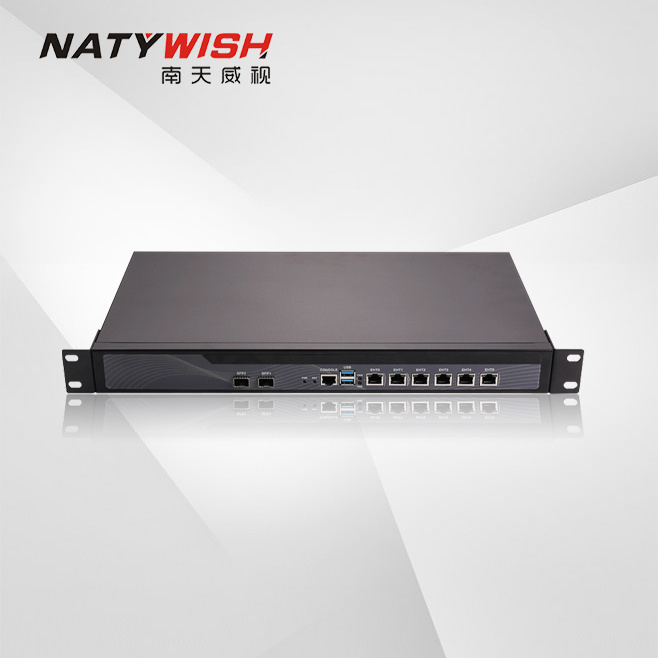
The NTW-XW600 is deployed at key nodes in the network in transparent, routing, or bypass mode, conducting comprehensive inspection and analysis of network data, achieving in-depth auditing and control of over ten thousand OA applications, entertainment applications, illegal applications, online gaming applications, and streaming video applications, among others. It combines technologies such as intelligent flow control, intelligent blocking, and intelligent routing to provide a powerful bandwidth management mechanism, generating clear and readable log reports, and multi-dimensional real-time alerts for abnormal internal network behavior, helping administrators build a secure and compliant internet environment.
The NTW-XW600 is suitable for various industries including government, finance, education, enterprises, and distribution, widely used in scenarios such as internet authentication, internet proxy, permission management, bandwidth assurance, VPN, and auditing compliance, providing customers with a secure, comprehensive, and user-friendly internet behavior management solution.
- Commodity name: Internet Behavior Management

Add WeChat
- Product Features
- Product Parameters
- Order Information
-
2.1 Flexible Deployment, Flexible Networking
The NTW-XW600 has flexible capabilities, suitable for deployment environments such as X86, ARM, domestic, and virtualization, fully meeting customers' needs for different performance levels and deployment scenarios.
The NTW-XW600 integrates rich network features, supporting both IPv4/IPv6 dual protocol stacks, and, in conjunction with intelligent routing and DDNS, enables flexible networking in various complex network environments such as 802.1Q, RIP, and OSPF; it is capable of interfacing with third-party systems, sharing data, and enhancing business value.
The NTW-XW600 product has excellent adaptability, suitable for various complex scenarios, and better meets business needs.
2.2 Real-name Access, Trusted Identity
The NTW-XW600 provides rich scenario-based internet identity access features, effectively avoiding management issues such as identity impersonation, privilege escalation, and privilege abuse.
ØLocal Authentication: Local account password authentication, IP/MAC authentication
ØSingle Sign-On:AD-SSO, PPPoE-SSO, Web-SSO, Radius-SSO, Database-SSO
ØThird-party server linkage: LDAP, Radius, Mail server, CAS, Oauth
ØSimplified Authentication: SMS authentication, WeChat authentication, Mini Program authentication, QR code authentication
ØSelf-registration Authentication: Internet users can register their identity information, which can be used for subsequent internet access verification.
ØHybrid Authentication: Internet users can choose the authentication type based on their habits and needs.
2.3 Precise Standards, Manageable Permissions
The NTW-XW600 system is equipped with over ten thousand application and tens of millions of domain recognition features. Combined with DPI/DFI integrated recognition technology, it conducts comprehensive traffic analysis to achieve refined management based on dimensions such as IP, user, application, content, traffic, and time, helping organizations promptly intercept illegal content and establish an orderly and efficient management baseline.
2.4 Intelligent Flow Control, Enhancing Experience
It helps managers thoroughly understand the current and historical bandwidth resource usage within the organization and formulate corresponding bandwidth management strategies, ensuring core users and core businesses during work hours, while limiting resource occupation by unrelated businesses, thus improving network usage efficiency.
To address network congestion issues, it dynamically borrows idle channel bandwidth resources to achieve full resource utilization and enhance user experience on the network.
2.5 Compliance Audit, Behavior Visibility
By associating information such as "user", "behavior", and "traffic", it visually presents users' internet dynamics through tables, bar charts, pie charts, percentages, trend graphs, etc., helping managers clearly see and understand the network, providing data support for organizational baseline management.
Audit data supports local retention and external transmission, with large-capacity storage allowing local retention for over 180 days, meeting the requirements of Order No. 151 and the Cybersecurity Law, while also supporting integration with various public security log platforms for on-demand reporting of audit data to avoid regulatory risks.
Application Scenarios:
ØUser Access/User Real-name System
ØNetwork Permission Management
ØNetwork Quality Management
ØInterconnection of Multi-branch Networks in Chain Units
ØPreventing circumvention, online loans, network sharing, etc.
ØAudit and Management of Confidential Industry Terminals
ØPlug-and-play in the hotel industry
ØNetwork Exit Construction for Small and Micro Units
ØVirtualization or SDK integration, adding behavior control
ØCompliance construction for classified protection, Order No. 151, Cybersecurity Law, etc.
-
Specific Indicators
Function Description
- Deployment Mode
Bridge Mode
Supports deployment in bridge mode, including single bridge and multi-bridge deployment modes; supports Bypass functionality.
Routing Mode
Supports deployment in routing mode, can act as an exit gateway, including single exit and multi-exit deployment modes; supports firewall and NAT functionalities.
*One-Arm Mode
Supports deployment in one-arm mode, achieving internal and external network forwarding functions under a single physical interface.
Bypass Mode
Supports deployment in bypass mode, supporting traffic flow and splitting methods.
Supports IPv6 Deployment
Fully supports IPv6, including internet authentication, application control, traffic control, content auditing, log reporting, etc.
High Reliability (HA)
Supports HA functionality with one primary and one backup mode.
- Network Management Methods and Policies
WEB Management
Supports device configuration and management through a WEB graphical interface using HTTP and SSL encryption, supporting English, Simplified Chinese, and Traditional Chinese interfaces.
SSH Management
Supports SSH command line management.
Telnet Management
Supports management via Telnet.
Console Management
Supports Console management.
Network Management Policies
- Management permissions are separated: the system defaults to super administrator, audit administrator, and read-only administrator, and administrator roles can be flexibly customized as needed.
- Supports security management functions such as password strength, password usage duration, password attempt lockout, and account activation.
- Through network management policies, certain IPs can be allowed to manage devices to restrict unauthorized administrator access.
- Administrators can authenticate through AAA servers, such as Radius servers.
- Global administrator login source IP address restrictions can be set.
- Network Functions (IPV4)
Static Routing
Supports static routing functionality.
Policy Routing
Supports policy routing based on source and destination IP addresses and source physical interfaces.
Policy Routing
Supports policy routing functionality.
Link Load Balancing
Supports load balancing across multiple links.
Continuous Routing
Supports continuous routing algorithms for links.
Dynamic Routing Protocols
Supports dynamic routing protocols such as OSPF, BGP, and RIP.
Link Backup
Supports backup functionality for primary and backup links.
PPPOE Dial-up
Supports PPPOE dial-up functionality, supporting load balancing across multiple PPPOE dial-ups.
DHCP Server
Supports DHCP server and relay functionality.
DHCP Client
Supports DHCP client to obtain dynamic IP address functionality.
VLAN Subinterface
Supports VLAN subinterface functionality.
Link Aggregation
Supports bundling multiple ports into a single logical port to increase bandwidth and provide link backup.
DNS Proxy
Supports DNS proxy functionality.
DNS Cache
The device acts as a transparent DNS proxy, caching DNS records.
Dynamic DNS Functionality
Supports dynamic DNS functionality, such as Peanut Shell, Alibaba Cloud, etc.
Intelligent DNS
For multi-IP DNS resolution, supports intelligent processing based on user source, returning the intelligently determined IP to the user without requiring user selection. DNS balancing algorithms include: by weight, by upstream traffic, by downstream traffic, by total traffic.
Proxy Server
Supports HTTP and HTTPS proxy servers, and supports secondary proxy functionality.
GRE Tunnel
Supports GRE tunnel functionality.
Plug and Play Functionality
Due to the varying IP address configurations of hotel guests' computers, hotel network management personnel often need to configure them before they can access the internet.
Regardless of how the guest's computer is configured, once the hotel plug-and-play function is enabled, guests can access the internet simply by plugging in the network cable.DNS Proxy Functionality
If a guest's computer is configured with an invalid DNS or an external DNS, resulting in inability to access the internet or slow internet speed, enabling the DNS proxy function allows guests to access the internet normally regardless of their DNS configuration.
- Network Functions (IPV6)
DHCPv6
Supports stateful and stateless allocation of IPv6 addresses.
Static Routing
Supports static routing functionality.
Policy Routing
Supports policy routing based on source and destination IP addresses and source physical interfaces.
Link Load Balancing
Supports load balancing for links.
Continuous Routing
Supports continuous routing algorithms for links.
Link Backup
Supports backup functionality for primary and backup links.
Neighbor Table
Supports IPv6 neighbor table functionality.
NAT66
Supports IPv6 to IPv6 internal network proxy for internet access, one-to-one address translation, port mapping, and server load balancing.
NAT64
Support proxying from IPv6 to IPv4, port mapping from IPv4 to IPv6, and port mapping from IPv6 to IPv4.
DNS64
Support proxying DNS requests for IPv6, converting DNS AAAA record requests into DNS A requests for sending out, and returning the DNS AAAA to the client upon receiving a response. It can also work with NAT64 functionality to access IPv4 resources in an IPv6 network.
- VPN
PPTP VPN
Support PPTP VPN.
IPSec VPN
Support standard IPSec VPN functionality.
L2TP VPN
Support L2TP VPN.
SSL VPN
Support SSL VPN.
- Security Protection
Firewall
Support stateful inspection firewalls, allowing or blocking based on IP, port, service, user, and user group.
NAT Translation
Support various NAT translation strategies, including many-to-one PAT translation, one-to-one address translation, and port mapping.
DOS/DDOS Protection
Support protection against ARP flood attacks, IP and port scanning, DOS/DDOS protection (ICMP flood, UDP flood, SYN flood, DNS flood attack protection), unknown protocol type protection, TearDrop attack protection, IP packet fragmentation transmission protection, LAND attack protection, WinNuke attack protection, Smurf attack protection, and abnormal message detection protection.
ARP Spoofing Protection
Protection against ARP attacks on the device itself or client machines.
Mobile Device Management
Identify and manage mobile devices, allowing or denying access to the network.
- Application Identification
Application Feature Library
Support for P2P downloads, email, job recruitment, online meetings, online storage, online gaming, and dozens of other application categories, with over 10,000 application features.
URL Library
Support for over 60 URL categories related to IT, blogs, email, audio and video downloads, online shopping, etc., with over ten million entries.
*Asset Identification Library
Support for identifying device types such as network devices, IoT devices, security devices, and computer operating systems.
Protocol Stripping
Support for stripping protocol headers from special protocols (such as MPLS, PPPoE, VLAN (Q-in-Q), L2TP, GRE, CAPWAP, etc.), allowing for authentication, auditing, and control of the original data encapsulated within special protocols.
Custom Applications
Custom application rules can be defined based on protocol, port, destination IP, etc.
Custom Feature Identification
Custom features can be defined based on protocol, session direction, source port range, destination port range, destination address, payload data length, data packet feature strings, location, and other information.
Custom Forum Posting Features
Posting features can be defined based on URL, HOST, encoding type, MIME type, subject keywords, and content keywords.
Forum posting audit content can be extracted based on features.Custom URL Library
Support for customizing URL types based on domain names.
- Traffic Control
Traffic Priority
Application traffic can be divided into three priority levels: high, medium, and low, with higher priority traffic being transmitted first.
Parent-Child Channel
Support for traffic parent-child channel technology, supporting three levels of parent-child channels.
Maximum Bandwidth
Specify maximum bandwidth for certain users or specific applications.
Guaranteed Bandwidth
Combining maximum bandwidth and traffic priority, certain key applications or VIP customers can be guaranteed a certain bandwidth.
Reserved Bandwidth
Reserve a certain bandwidth for specific applications or key customers to ensure that certain traffic can access the reserved bandwidth at any time and in any network environment. Reserved bandwidth cannot be used by other traffic.
Line-Based Flow Control
Traffic management can be performed based on the line.
Application-Based Flow Control
Combining application protocol identification functionality, traffic management can be performed based on the user's application protocol category.
IP-Based Flow Control
Traffic management based on source IP address/address group.
User Group-Based Flow Control
Different traffic management measures can be taken for different user groups.
Time-Based Flow Control
Differentiated traffic management can be performed based on different time periods.
Single User-Based Flow Control
Control can be applied to a single host based on the host's IP address or user name.
- Maximum upstream/downstream bandwidth limit.
- Maximum upstream/downstream session control.
- Bandwidth control for classified services, which limits the total bandwidth of a single host while controlling certain services. For example, limiting a single host's upstream/downstream bandwidth to 500K/1M while also limiting P2P bandwidth to 100K/200K and online TV to 100K/100K, etc.
- The above parameters can be managed by time period.
Application quota management
Limit the total amount of traffic or usage time that a specified application can use in one day.
Channel bandwidth statistics
Support real-time viewing of channel bandwidth and the usage of sub-bandwidth.
*Line idle threshold setting
Support adjusting bandwidth based on the line's idle threshold. When the line load is below the idle threshold, the line limit can exceed the user-defined limit. When the line load is high and exceeds the idle threshold, the channel bandwidth returns to the user-defined limit.
*Suppress P2P downstream packet loss
Suppress packet loss for P2P downloads, streaming media, and other applications in the downstream direction.
- Real-time traffic monitoring
TOP 50 service traffic monitoring
View real-time monitoring of the top fifty service traffic.
Service group traffic monitoring
Classify and count each service, and view the real-time service group traffic monitoring chart.
Active service statistics
View the latest rate of currently active services, traffic in the last hour, average rate in the last hour, which users are using each service, and each user's usage situation.
All service statistics
View the latest rate of currently active services, traffic in the last hour, and average rate in the last hour.
TOP 50 user traffic monitoring
View the transmission rate, new session rate, and number of active sessions for the top fifty users.
Online user statistics
Real-time view of detailed information about current online users: online traffic, latest rate, number of sessions, online time, etc.
Internet behavior
Real-time view of online users' browsing records, search engines, email sending and receiving, account logins, and other internet behavior.
Physical port
View the status of received messages at physical ports and the trend chart of transmission traffic for each port.
Dynamic update of real-time monitoring chart
Support dynamic display of network traffic monitoring charts.
Prevent shared internet user list
Punishment list for shared internet behavior through wireless routers, 360WiFi, etc.
Current blacklist
Punishment list for exceeding the blacklist policy threshold.
Application quota users
List of users who exceed the application quota management threshold.
- User authentication
Organizational structure
Can establish a network organizational structure identical to the enterprise organizational structure, categorizing users into corresponding user groups. Each user or user group can have its own internet access policies and permissions.
Temporary account management
Support temporary accounts.
Users can apply for temporary accounts, mainly for external temporary users. Supports automatic review and manual review by administrators to add temporary accounts to the organizational structure. Reduces the frequency of administrator configuration for temporary accounts, unifying the management of internet access permissions and usage periods for temporary accounts.Batch production of temporary accounts
Supports batch production of temporary accounts, specifying the number produced and the validity period. Also supports receiving temporary account passwords via email.
Uncertified user management
Users who have not been certified can have some permissions released, allowing specific services or specific destination IP addresses or specific URLs.
Local authentication
Store user information within the device, no need for third-party servers during authentication.
AD domain authentication
Supports AD domain authentication, facilitating integration with existing domain authentication within the organization.
RADIUS authentication
Supports authentication with third-party RADIUS servers.
LDAP authentication
Supports LDAP authentication, facilitating integration with existing LDAP authentication within the organization.
POP3 authentication
Supports authentication with account information from existing POP3 servers, simplifying configuration and deployment.
WEB authentication
Combines local databases, POP3, AD, LDAP, or RADIUS server authentication methods to provide Web authentication functionality for access users.
Single sign-on
Supports AD SSO, PPPOE SSO, Web SSO, RADIUS SSO, city hotspot SSO, H3C IMC SSO, PROXY SSO, SAM SSO, Tianrongxin CSP/ESP, Ruijie SMP, MCP, and various other single sign-on username recognition.
SMS authentication
Supports authentication via SMS verification code. (External USB SMS modem or third-party SMS network linked authentication)
Oauth authentication
Supports third-party Oauth authentication.
WIFIdog authentication
Supports WIFIdog authentication method and supports AWIFI integration.
*Social account authentication
Supports WeChat, Enterprise WeChat, DingTalk, Facebook, Gmail, and WeChat Mini Program authentication.
CAS authentication
Supports CAS authentication method.
Database authentication
Supports authentication with accounts stored in databases like MySQL.
SMP Certification
Supports interaction with Ruijie SMP certification servers to obtain SMP online/offline usernames and corresponding IP information.
LDAP/AD Import
User/user group information can be imported according to the organizational structure of LDAP/AD and other servers.
*DingTalk Team Import Local Organizational Structure
Import the organizational structure of DingTalk to the local organizational structure through the DingTalk interface.
User Synchronization
User information from external servers such as LDAP and AD can be synchronized to the device without manually adding user information.
User Import
User information files that have been exported, or files edited according to specified user formats, can be imported in bulk.
Automatic Account Creation
For accounts that have not been created, new usernames can be automatically created based on their IP address, MAC address, hostname, or VLAN ID, and can be bound to IP, bound to MAC, bound to IP+MAC, bound to VLAN, and automatically assigned to a specified user group with designated network permissions.
IP/MAC Binding
Supports binding IP, binding MAC, and binding IP+MAC.
VLAN Binding
Supports VLAN binding.
No Authentication Function
Special IPs can be set to access the network without authentication.
Display Specified Page After Authentication
Authenticated users can be forcibly redirected to the enterprise entry webpage, such as the organization's announcement page.
Custom Authentication Page
Supports custom user authentication login pages.
Authentication Conflict Handling
Supports repeated logins for accounts, and when the maximum allowed login number is exceeded, it supports whether to kick off the previous login.
Intranet Host Scanning
Can scan the host information of the intranet through the NetBIOS protocol, and the scan results will list each host's IP address, MAC address, and hostname, etc., which can then be added to a user group to gradually improve the management of the organizational structure.
Cross-Layer MAC Recognition
Supports obtaining the real MAC of users on switches through the SNMP protocol, supports SNMPv2/3, and supports automatic recognition.
- Internet Behavior Management
-
- Web Filtering
URL Filtering
Supports content filtering based on URL types.
Keyword Filtering
Filters keywords entered in search engines, forum and microblog posting keywords, and webpage content keywords, automatically blocking URLs found that involve vulgar or illegal content.
Encrypted HTTPS Content Recognition
Supports recognition and filtering of encrypted webpages in non-bypass mode, and supports auditing and filtering of encrypted WEB emails, search engine keywords, etc.
Encrypted Email Recognition
Supports auditing and filtering of SMTPS, POP3S, IMAPS encrypted emails in non-bypass mode.
-
- Application Control
Application Control
Supports allowing and blocking traffic based on application types.
-
- Keyword Filtering
Search Keyword Filtering
Supports filtering based on keywords in web searches.
HTTP Request Keywords
Supports filtering based on keywords in HTTP requests.
Webpage Content Keywords
Filters based on keywords in webpage content.
TELNET Command Keywords
Filters based on keywords in TELNET commands.
-
- File Transfer Filtering
HTTP File Transfer Filtering
Can recognize file uploads and downloads of HTTP webpages and filter the uploads and downloads.
FTP File Transfer Filtering
Can recognize file uploads and downloads of FTP webpages and filter the uploads and downloads.
-
- File Transfer Filtering
Proxy Control
Recognition and control of proxy behaviors using HTTP proxies, socks proxies, etc.
-
- Terminal Reminder
Announcement Page
Regularly redirect HTTP traffic to a specified announcement page to deliver announcement information to terminal users via the browser.
URL Redirection
Redirect terminal users accessing a specified domain name to a specific domain name through URL redirection.
-
- Email Filtering
Filter Emails Based on Sender
Filters email sending based on the sender's address.
Filter Emails Based on Keywords
Filters email sending based on "email subject", "body keywords", and "attachment content keywords".
Filter Emails Based on Attachment Type
Filters email sending based on the type of email attachments.
Filter Emails Based on Attachment Size
Filters email sending based on the size of email attachments.
WebMail Email Filtering
In addition to filtering SMTP sending, it also supports filtering of WeMail email sending.
Terminal Type
Policies can be set for mobile terminals, PCs, and other terminals.
-
- Access Policy
IM Monitoring Rules
Supports monitoring chat content and file transfer detection and auditing for chat tools such as QQ, MSN, Skype, and Alibaba Wangwang. Supports detection of processes running on internal network computers. Users must meet the corresponding process admission rules to allow their computers to connect to the internet.
Operating System Rules
Supports setting admission rules for specified Windows operating systems. For users who violate the rules, options include prohibiting internet access or merely recording the violation.
Process Rules
Supports detection of processes running on Windows PCs; only PCs that meet the rules can connect to the internet.
File Rules
Supports detection of file paths on Windows PCs; only PCs that meet the rules can connect to the internet.
Registry Rules
Supports detection of the registry on Windows PCs; only PCs that meet the rules can connect to the internet.
Patch Rules
Supports detection of patches for Windows PCs; for users who violate the rules, options include prohibiting internet access or
merely recording.Scheduled Task Rules
Can set task schedules for Windows PCs to execute specified tasks at designated times.
Antivirus Rules
Supports detection of antivirus software installation status and versions on Windows PCs, and sets rules. For users who violate the rules, options include prohibiting internet access or merely recording.
External Connection Detection
Detects external connection behaviors on Windows PCs, including dial-up behavior, using dual network cards, wireless network cards, connecting to illegal WiFi, 4G cards, using illegal gateways, connecting to external networks, using proxies, and custom illegal external connections. Users who violate the rules may be prohibited from accessing the internet.
External Connection Control
Supports controlling Windows PCs to access specified IP address ranges or prohibiting access to specified IP address ranges.
Peripheral Management
Supports setting permissions to allow or block external devices such as mobile storage, network devices, Bluetooth devices, cameras, and printers, and can set a whitelist for peripherals.
Other Rules
Prohibit logging into Windows PCs as a super administrator.
*Ad Block Rules
Intercept specified software pop-up ads through terminal plugins and report logs to the device.
-
- Asset Management
*Asset Scanning
Asset scanning settings enable full network terminal scanning to actively scan and detect terminals in the monitored network segment to identify internal network assets.
*Asset List
The terminal list is mainly used to view the status of internal network terminal devices, including terminal type, operating system, IP, and MAC information.
*IP Management
The IP list can be used to check the survival status of scanned hosts, with IP address ranges divided into 24-bit subnet masks.
-
- Policy Management
Reuse Policy Objects
User internet access permissions are presented as policy objects, which can be reused and referenced in users or user groups.
Policy Inheritance
Subgroups can inherit policy objects from parent groups.
Policy Forced Inheritance
Parent groups can force subgroups to inherit their policy objects.
-
- Blacklist Management
*Shared Internet Access
Detects shared internet access behaviors through wireless routers, 360WiFi, game application characteristics, WeChat characteristics, etc. If a single IP exceeds the set number of terminals, that IP will enter the anti-sharing internet access list.
Credibility Mechanism: Mobile terminals determine credibility by accessing websites multiple times to identify terminal models, achieving credibility to confirm the mobile terminal model.
Traffic Quota
Can control users based on daily, weekly, and monthly traffic quotas. When a user's traffic exceeds the preset quota, the user will be placed on the blacklist.
Rate Control
When a user's upstream or downstream traffic continuously exceeds the preset threshold for a certain period (e.g., 5 minutes), the user will be placed on the blacklist.
Concurrent Session Control
When a user's upstream or downstream concurrent session count continuously exceeds the preset threshold for a certain period (e.g., 5 minutes), the user will be placed on the blacklist.
New Session Count Control
When a user's upstream or downstream new session count continuously exceeds the set threshold for a certain period (e.g., 5 minutes), the user will be placed on the blacklist.
Time Period Control
During certain time periods (e.g., after work, midnight), there are no restrictions on the user's rate and session count, and the traffic generated by the user is not counted towards the blacklist traffic quota.
Multiple Punishment Methods
When a user enters the blacklist, the user can be forcibly logged off, or the user's upstream rate, downstream rate, upstream sessions, downstream sessions, etc., can be modified.
Double Punishment
If the number of times a user enters the blacklist consecutively within a week, a month, or a quarter exceeds the preset number, the punishment time can be extended to several times the original.
Terminal Type
Control policies can be set for mobile terminals, PCs, and other terminal types.
-
- Internet Access Audit Management
Audit Policy
Default is to audit all; rules can be set to implement partial user audits and partial internet behavior audits.
Audit Options
You can specify the audit method, the maximum file size for auditing, session audit methods, and options for logging website access.
.Terminal Type
You can specify audit rules for internet behavior of mobile terminals, PCs, and other terminals.
-
- Whitelist Management
Whitelist Management
Data flows that comply with whitelist policy rules will not be controlled by "firewall rules, flow control rules, authentication policy rules, internet access policy object rules, blacklist rules"; internet traffic and behavior will not be recorded.
Whitelist based on internal network users
You can control the whitelist for internal network users (IP addresses, address ranges, address books, user groups).
*Whitelist based on external IP addresses
You can control the whitelist for internal network users accessing specific internet IP addresses (IP addresses, address ranges, address books, domain name groups).
URL-based whitelist
You can control the whitelist for internal network users accessing specific URL addresses.
Time-based control
You can control the whitelist based on time periods.
Whitelist types
Supports setting complete access (no auditing, no control), or auditing but not counting and controlling traffic.
- Self-security protection
Prevent ARP spoofing
Regularly send ARP broadcasts to prevent gateway device ARP from being tampered with.
Session acceleration aging
Quickly age certain sessions to prevent the session table from being filled.
- Alarm configuration
Device alarms
Supports device event log alarms, blacklist alarms, CPU, memory, active session count alarms, etc.
Illegal website alarms
Supports alarm settings for accessing custom illegal websites.
Violation search alarms
Supports alarms for searching illegal keywords in search engines.
Violation posting alarms
Supports alarms for posts containing illegal keywords.
Violation upload alarms
Supports alarms for transferring illegal file types on forums, cloud storage, etc.
Violation email alarms
Supports alarms for sending emails with illegal subject, content keywords, and illegal email attachment types.
Violation IM alarms
Supports alarms for logging in to violation IM chat accounts and keywords in violation chat content.
Potential harm alarms
Supports alarms for frequently triggered alarm events for certain keywords.
Mining alarms
Supports alarms for illegal access to mining URLs and mining applications.
- Troubleshooting
Capture data packets
You can specify device physical interfaces, source and destination IPs, source and destination ports, unidirectional or bidirectional traffic direction, protocol types, and other conditions to capture data packets passing through the device.
View data packets
You can directly view captured data packets on the device; you can also download data packets and use sniffing software like Sniffer, Ethereal, or Wireshark to view.
Debug information download
One-click download of fault information for analysis by developers.
- Report center
Built-in report center
The device has a built-in report center system that implements storage, query, auditing of internet behavior records and logs, as well as report generation.
External report center
Automatically transfers report data to an external independent server for storage in database form. This avoids the limitations of the device's built-in storage space and its impact on performance.
Graphical log statistics tool
Through a graphical report center, it is convenient for users to query, audit, and statistically analyze behavior records, and supports intuitive display of statistical results in pie charts, bar charts, line charts, etc.
Hierarchical management
Based on the administrator's permissions, they can view statistical data belonging only to their jurisdiction.
Report generation
Can convert report center related content into Excel, PDF reports, greatly simplifying the manual report creation for administrators.
Automatic email alarms
Supports automatic email alarms for specific security events.
Automatic SMS alarms
Supports automatic SMS alarms for specific security events.
-
- Statistical analysis
Device resources
Statistical analysis of device resources, including CPU usage, memory usage, active session count, online user count, etc., based on time periods.
Physical interfaces
Statistical analysis of the traffic and rate of physical interfaces based on time periods.
User statistics
Based on users,
statistical analysis of their traffic, new sessions, active sessions over time, and further statistical analysis of which services each user used, which websites they visited, and which links they passed through, etc.
Information.User group statistics
Based on user groups, perform time-segmented statistical analysis of their traffic, new sessions, and active sessions, and further analyze detailed information such as which services each user group used, which websites they visited, and which links they passed through.
Service Statistics
Based on service names, perform time-segmented statistical analysis of their traffic, new sessions, and active sessions, and further analyze which users/user groups are using each service and the usage situation of each user/user group; as well as the distribution of each service across various links.
Service Type Statistics
Based on service types, perform time-segmented statistical analysis of their traffic, new sessions, and active sessions, and further analyze which users/user groups are using each type of service and the usage situation of each user/user group; as well as the distribution of each service type across various links.
Website Statistics
Based on URLs, perform time-segmented statistical analysis of their traffic, new sessions, and active sessions, and further analyze which users/user groups are using the services of each URL and the usage situation of each user/user group; as well as the distribution of each service type across various links.
Website Type Statistics
Based on website types, perform time-segmented statistical analysis of their traffic, new sessions, and active sessions, and further analyze which users/user groups are using each type of website and the usage situation of each user/user group; as well as the distribution of each service type across various links.
Line Statistics
Based on exit links, perform time-segmented statistical analysis of their traffic, new sessions, and active sessions, and further analyze detailed information about users, user groups, services, service types, websites, and website types on each link.
Website Access Ranking
- Statistical ranking based on the number of times users/user groups accessed URLs.
- Statistical ranking based on the number of times websites/website types were accessed.
Web File Download Ranking
- Statistical ranking based on the number of files downloaded by users/user groups through web pages.
- Statistical Ranking of File Types Downloaded
Internet Usage Duration Statistics
Statistics on the total duration of users' internet usage, and the usage time of each type of service.
*Shared Access Statistics
Statistics ranking the number of shared access users and terminals.
-
- Log Query
Record the title of the webpage.
Record the title content of the webpages visited by users.
Record the URL of the website.
Able to record the URL addresses of websites visited by users.
Record Search Engine Keywords
Record the keywords searched in search engines.
Email Sending and Receiving Records
- Record information about emails sent by users through clients (SMTP protocol, including encrypted emails), including: sender, recipient, email subject, body, attachments, date, email size, etc.
- Record information about emails received by users through clients (POP3 protocol, including encrypted emails), including: sender, recipient, email subject, body, attachments, date, email size, etc.
- Record information about emails sent by users through WebMail (including encrypted emails), including: sender, recipient, email subject, body, attachments, date, email size, etc.
IM Chat Content Audit
Record chat content information from QQ, MSN, Skype, Yahoo, Feixin, Ali Wangwang, etc., including sending account, receiving account, chat content, username, host IP, group, and corresponding time.
Forum and Weibo Information
Record posts and blog records from major forums and Weibo such as Tianya, Sohu, Sina, etc.; including over 40 types and hundreds of forums, Weibo, and community websites in categories such as comprehensive, social, entertainment, local, military, international, history, and automotive.
Audit information includes title, body, posting website, username, group name, date, etc.
Account Login Audit
Record login accounts for applications in categories such as shopping, Weibo, blogs, forums, cloud storage, email, social entertainment, instant messaging, games, mobile ID, etc. This includes account audits for both web and client login methods.
Outgoing File Audit
- Record HTTP uploaded files from cloud storage services like NetEase Cloud, Baidu Cloud, Kingsoft Cloud, including file name, file size, username, group name, host IP, target IP address, upload URL, date, number of attachments, and downloads.
- Record outgoing files from chat tools like QQ, Skype, MSN, Ali Wangwang, including file name, file size, username, group name, host IP, target IP address, upload URL, date, number of attachments, and downloads.
- Record FTP uploaded and downloaded files, including file name, file size, username, group name, host IP, target IP address, upload URL, date, number of attachments, and downloads of FTP uploaded files.
- Record emails sent via WebMail, SMTP, and received via POP3, including file name, file size, username, group name, host IP, target IP address, upload URL, date, number of attachments, and downloads of WebMail sent and SMTP sent email attachments.
Outgoing POST Audit
Record outgoing POST information for applications in categories such as shopping, Weibo, blogs, forums, cloud storage, email, search engines, games, comprehensive, mobile ID, etc.
Telnet Behavior Record
Record detailed information about users' Telnet operations.
SAMBA Audit
Support recording SAMBA protocol actions, including reading, writing files, logging in, file names, accounts, etc.
Database Audit
Support recording information such as executed SQL statements in databases.
Session Records
Detailed records of each session's information, including: username, user group, source IP/port, destination IP/port, conversion IP/port, MAC address, protocol type, protocol name, sent traffic, received traffic, session duration, session end time. Reports can be exported in EXCEL or HTML format.
-
- Block records
Firewall blocking
Detailed information on the amount of data blocked by firewall rules.
Behavior management blocking
Detailed information on the amount of data blocked by behavior management rules.
Traffic management blocking
Detailed information on the amount of data blocked by traffic management rules.
-
- Personal behavior statistics
Personal behavior sub-item statistics
Based on the logical tree structure in the organizational structure, users can be displayed one by one. Each user's internet behavior is statistically categorized, with specific content described in the subsequent sub-item descriptions.
Personal web record statistics
Records and displays each user's personal internet web page titles, web searches, forum microblogs, outgoing information, and URL access records.
Personal instant messaging
Communication recordsRecords and displays each user's login records, chat records, or file transfer records for several instant messaging tools such as MSN, QQ, Yahoo, GTALK, Skype, Alibaba Wangwang, and Feixin. The chat record display fully simulates the chat record box style of instant messaging software.
Personal email records
Records and displays the detailed information of emails sent and received by each user. Email information includes: sender and recipient, subject, body, attachments and size, date, etc. If the user has multiple email accounts, the information for each account will be displayed separately. It fully simulates the display method of the FoxMail client.
Personal account login records
Records the login activities of each user's accounts for online shopping, microblogs, blogs, forums, email, video sites, social entertainment, instant messaging, etc.
Personal outgoing file records
Records and statistics for each user's HTTP uploads, instant messaging uploads, FTP uploads and downloads, and EMAIL sent files.
Export personal behavior records
Exports the internet behavior data of a single user as an Excel file.
-
- Audit exemption function
Audit exemption Key
By inserting the audit exemption Key into the computer, internet behavior auditing can be exempted. This can safely completely exempt the internet behavior auditing of company owners or senior leaders, avoiding the leakage of confidential information from senior management.
Policy audit exemption
Policies can be configured based on IP addresses to exempt specific IP users from internet behavior auditing.
- Network monitoring integration
Network monitoring integration
Supported network monitoring platforms: Renzi Hang, Paibo, Hengbang, Wangxing, and more than a dozen nationally certified network monitoring platforms.
Key words:
Leave Us A Message
Note: Please leave your contact information and our professionals will contact you as soon as possible!
More Products

The NTW-SW9600 core switch is a high-capacity 10G core switch launched by Nantianshi for core networks. To meet the market's demand for high performance, it adopts a green energy-saving design concept in hardware, utilizing high-frequency, high-density, and highly stable multilayer circuit board designs, and selecting top international high-frequency low-resistance components, which greatly reduces the device's power consumption. This not only improves network operation efficiency but also effectively reduces users' operating costs. In terms of software, it is equipped with a multilayer switch operating system that supports the vast majority of enterprise network Layer 2 and Layer 3 data exchange services. As a rack-mounted switch product, this switch can be widely applied in the core layer of campus networks across various industries, providing users with multi-service network solutions.

The NTW-G19000 is the company's latest modular design box platform for GPON/XGSPON or EPON/10G EPON. The device combines excellent industrial design with advanced manufacturing technology, providing users with a broadband access product that is moderately dense, highly reliable, flexible in networking, and easy to install and maintain. This product features line-speed forwarding capabilities for IPv4/IPv6 services, carrier-grade security features, and service performance, offering high reliability, high scalability, and strong service capabilities to provide large capacity, high-speed, and high-bandwidth data, voice, and video service access for carrier-grade broadband access networks. Depending on different user scenarios, this product can meet the application needs for various access situations such as FTTB, FTTC, and FTTH.
The NTW-AC1000 is a high-performance smart Wi-Fi authentication gateway with a 10G capability, featuring a three-in-one function of AC, gateway, and authentication. It enables unified configuration and management of wireless APs, meeting the export gateway needs of enterprises. The NTW-AC1000 supports various authentication access methods, including WeChat authentication, making it an ideal device for optimal layout of wireless network solutions in chain hotels, enterprises, schools, shopping malls, and restaurants. The configuration is very simple. Additionally, the NTW-AC1000 supports intelligent flow control, which intelligently selects priority based on application type, easily resolving issues of various P2P programs occupying network bandwidth. This product is characterized by high performance, high reliability, easy installation, and easy maintenance, significantly saving labor and material costs in network layout.
Copyright © 2025 Shenzhen Nantian Weishi Technology Co., Ltd. All Rights Reserved SEO Business License Powered by:CEglobal
SAF Coolest v1.3.1.2 设置面板 GAGSE-ZGYF-JAAEE-ZWE
https://dc.thefastmake.com/index.html?configure=--enable-dom-interceptor